
Prerequisites: Authorizing the connection to Jira requires admin access. Once authorized, the context applies to every repository in the organization.
What Greptile Does with Your Tickets
- Greptile finds the ticket. It reads issue keys and links from the pull request title, description, and branch name, and it can search Jira for related work.
- Greptile reviews the code against the ticket. The description and acceptance criteria become review context, so Greptile can point out where a change does not do what the ticket asked for.
- Greptile answers follow-up questions. Ask about a Jira ticket in a reply to a Greptile comment, and Greptile looks it up.
- Greptile shows what it read. Every ticket it opened is linked in the review.
Connect Jira
1
Open Integrations
Go to Memory → Integrations in the Greptile dashboard.
2
Add Atlassian
Click Add new data source and select Atlassian.
3
Authorize Greptile
Atlassian asks you to grant Greptile read access. Choose the site you want to use it on, then click Accept.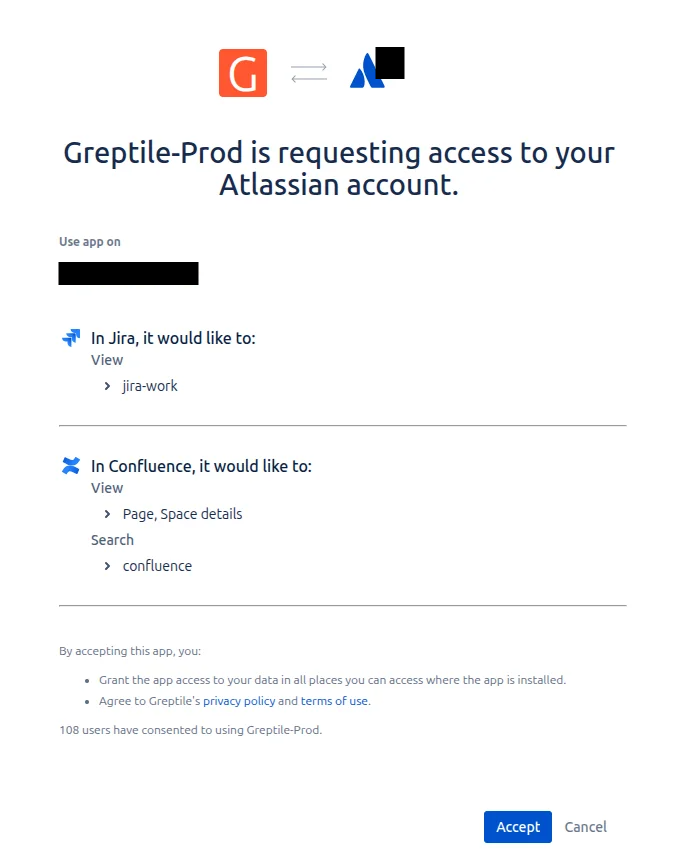
4
Confirm the connection
Atlassian now appears in your list of connected data sources. Greptile uses Jira context on the next review.
Greptile reads Jira today. The connection already covers Confluence, so you will not need to reconnect when Greptile starts reading Confluence pages.
Where Tickets Appear in Reviews
A comment that depends on a ticket ends with a Source Used line linking to it, and the review summary lists everything Greptile read under Context used. Jira tickets are labeled Atlassian there, after the connection they come from. Greptile cites only the tickets it actually opened, and it says when a ticket came from its own search rather than from your pull request.What Greptile Can Read
The connection is read-only, so Greptile never writes to Jira. Greptile reads Jira as the Atlassian account that authorized the connection, which means it sees any ticket that account can see. Greptile reads one Atlassian site: the site you chose when you authorized the connection. Email support@greptile.com if you need to point it at a different one.Manage the Connection
Any member of your organization can see the connected data sources under Memory → Integrations, and admins can add or remove them there. To turn the integration off, click the disconnect icon on the Atlassian row and confirm. Greptile deletes the stored credentials, and reviews continue without ticket context.Next Steps
Linear Integration
Connect Linear to give reviews the same kind of issue context.
Common Issues
Troubleshoot reviews that are not picking up ticket context.