> ## Documentation Index
> Fetch the complete documentation index at: https://www.greptile.com/docs/llms.txt
> Use this file to discover all available pages before exploring further.
# Reports & Analytics
> Generate code review reports and analytics using MCP tools. Track PR status, weekly summaries, team metrics, and review completion rates from your IDE.
Use MCP tools to generate reports on review activity and track team progress.
## PR Status
Get a quick status check for any PR:
```text theme={}
What's the review status for PR #5 in owner/repo?
```
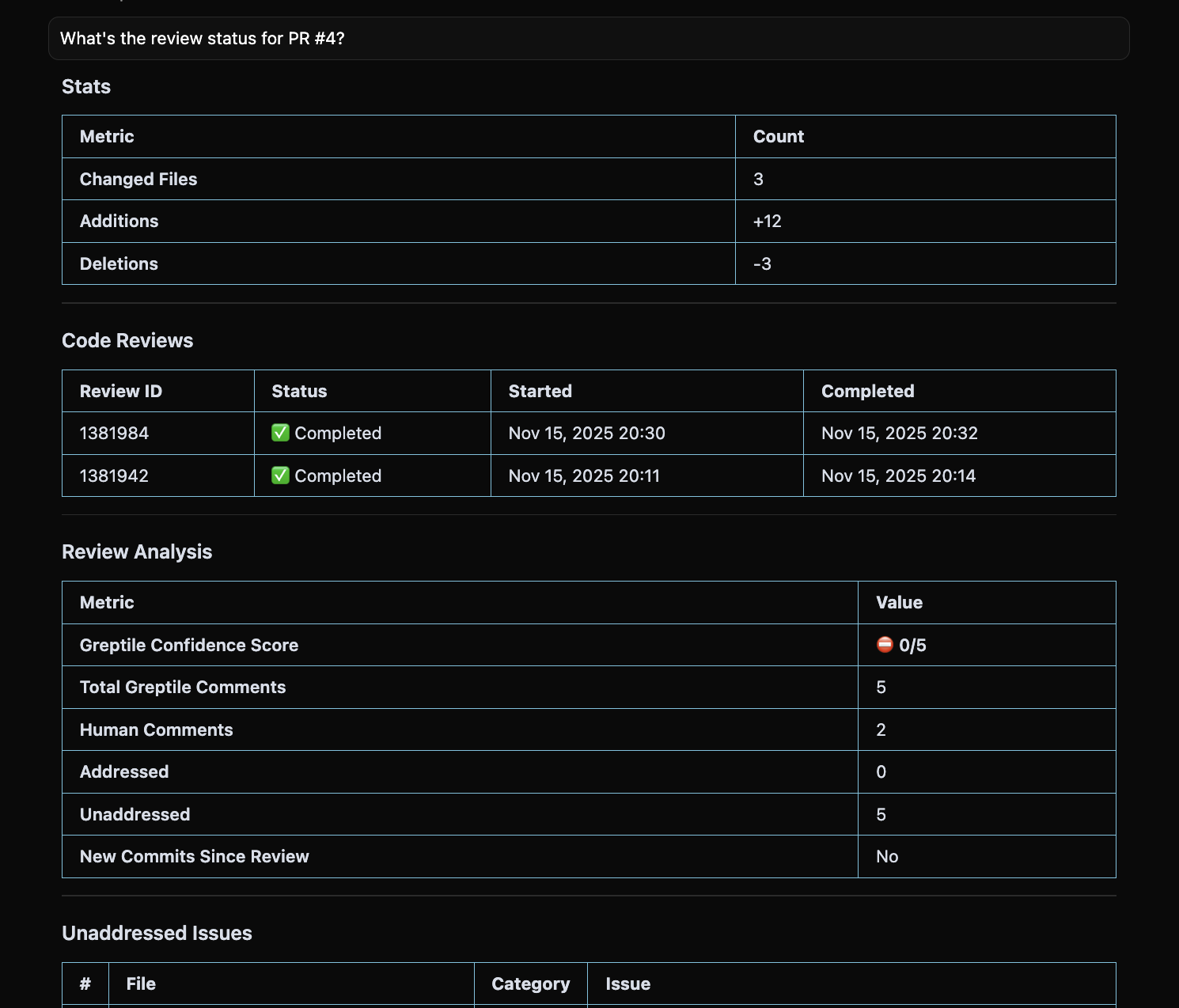 **Tool:** [`get_merge_request`](/mcp-v2/tools#get_merge_request)
Response includes:
* `reviewCompleteness`: "2/5 Greptile comments addressed"
* `hasNewCommitsSinceReview`: Whether re-review needed
* `addressedComments` / `unaddressedComments`: Full lists
***
## Weekly Summary
Generate a report of open PR status:
```text theme={}
Give me a weekly summary of all open PRs with their review status and make a nice visual graph for important stats.
```
**Tool:** [`get_merge_request`](/mcp-v2/tools#get_merge_request)
Response includes:
* `reviewCompleteness`: "2/5 Greptile comments addressed"
* `hasNewCommitsSinceReview`: Whether re-review needed
* `addressedComments` / `unaddressedComments`: Full lists
***
## Weekly Summary
Generate a report of open PR status:
```text theme={}
Give me a weekly summary of all open PRs with their review status and make a nice visual graph for important stats.
```
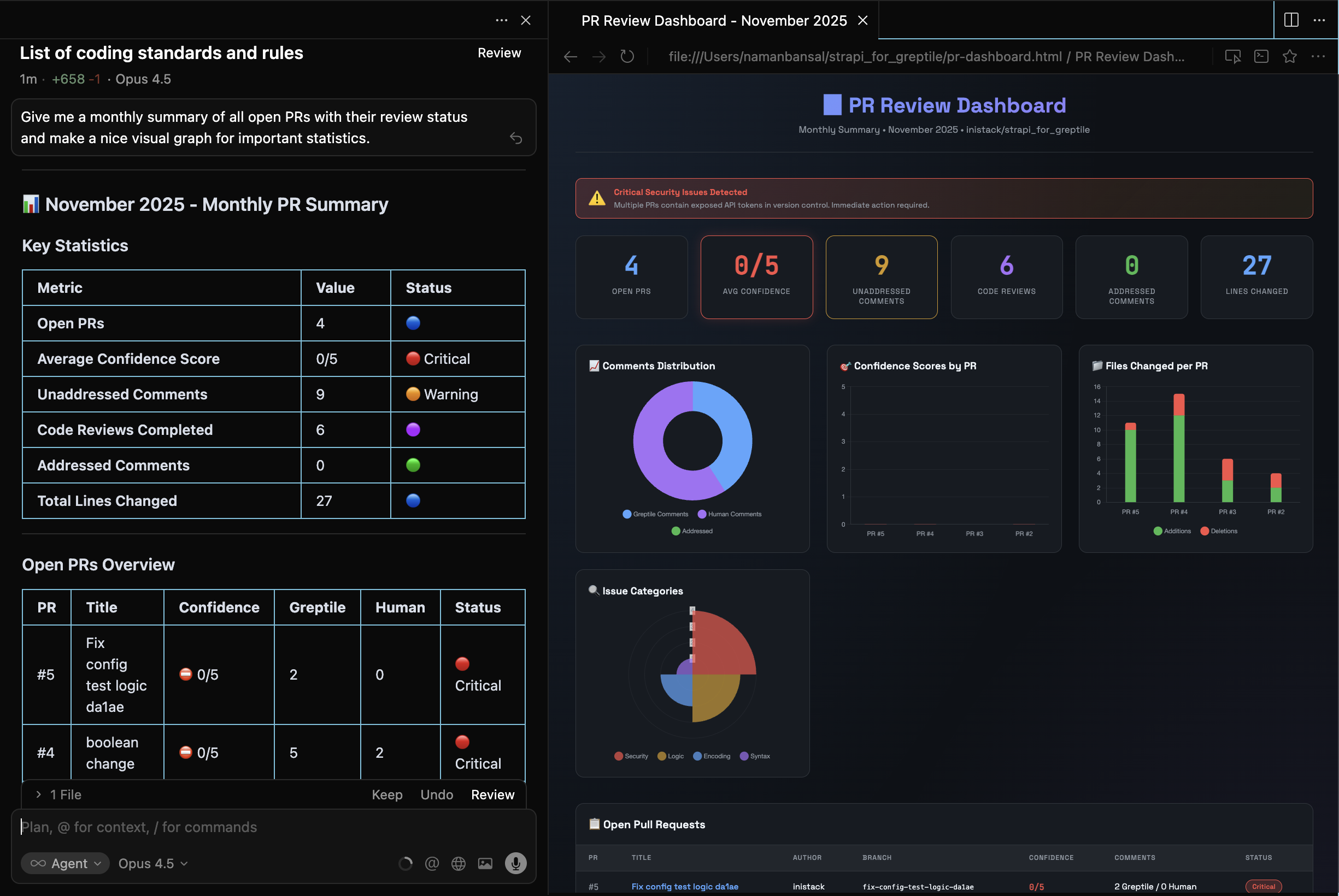 The assistant:
1. Calls `list_pull_requests` with `state: "open"`
2. For each PR, calls `get_merge_request` to get `reviewAnalysis`
3. Compiles: PR number, title, author, age, completeness, unaddressed count
Claude took the MCP data and whipped up a basic webpage to visualize it.
***
## Team Metrics
```text theme={}
How many unaddressed Greptile comments do we have per repository?
```
**Tool:** [`list_pull_requests`](/mcp-v2/tools#list_pull_requests) + [`list_merge_request_comments`](/mcp-v2/tools#list_merge_request_comments) for each
```text theme={}
What percentage of Greptile comments have been addressed across all open PRs?
```
**Tool:** [`get_merge_request`](/mcp-v2/tools#get_merge_request) → aggregates `reviewAnalysis` across PRs
```text theme={}
Which open PRs are older than 7 days and still have unaddressed comments?
```
**Tool:** [`list_pull_requests`](/mcp-v2/tools#list_pull_requests) → filters by `createdAt`
```text theme={}
How many unaddressed comments have suggested code fixes?
```
**Tool:** [`search_greptile_comments`](/mcp-v2/tools#search_greptile_comments) → checks `summary.withSuggestions`
```text theme={}
Which files have the most unaddressed Greptile comments?
```
**Tool:** [`search_greptile_comments`](/mcp-v2/tools#search_greptile_comments) → groups by `filePath`
***
## Code Review History
```text theme={}
Show me the last 10 completed code reviews
```
**Tool:** [`list_code_reviews`](/mcp-v2/tools#list_code_reviews) with `status: "COMPLETED"` and `limit: 10`
```text theme={}
Get details for code review 1382118
```
**Tool:** [`get_code_review`](/mcp-v2/tools#get_code_review)
Returns `strictness`, `totalFiles`, `completedFiles`, full PR info.
```text theme={}
Are there any failed or skipped code reviews?
```
**Tool:** [`list_code_reviews`](/mcp-v2/tools#list_code_reviews) with `status: "FAILED"` or `"SKIPPED"`
***
## Next Steps
Fix issues identified in your reports
Track which patterns trigger the most comments
The assistant:
1. Calls `list_pull_requests` with `state: "open"`
2. For each PR, calls `get_merge_request` to get `reviewAnalysis`
3. Compiles: PR number, title, author, age, completeness, unaddressed count
Claude took the MCP data and whipped up a basic webpage to visualize it.
***
## Team Metrics
```text theme={}
How many unaddressed Greptile comments do we have per repository?
```
**Tool:** [`list_pull_requests`](/mcp-v2/tools#list_pull_requests) + [`list_merge_request_comments`](/mcp-v2/tools#list_merge_request_comments) for each
```text theme={}
What percentage of Greptile comments have been addressed across all open PRs?
```
**Tool:** [`get_merge_request`](/mcp-v2/tools#get_merge_request) → aggregates `reviewAnalysis` across PRs
```text theme={}
Which open PRs are older than 7 days and still have unaddressed comments?
```
**Tool:** [`list_pull_requests`](/mcp-v2/tools#list_pull_requests) → filters by `createdAt`
```text theme={}
How many unaddressed comments have suggested code fixes?
```
**Tool:** [`search_greptile_comments`](/mcp-v2/tools#search_greptile_comments) → checks `summary.withSuggestions`
```text theme={}
Which files have the most unaddressed Greptile comments?
```
**Tool:** [`search_greptile_comments`](/mcp-v2/tools#search_greptile_comments) → groups by `filePath`
***
## Code Review History
```text theme={}
Show me the last 10 completed code reviews
```
**Tool:** [`list_code_reviews`](/mcp-v2/tools#list_code_reviews) with `status: "COMPLETED"` and `limit: 10`
```text theme={}
Get details for code review 1382118
```
**Tool:** [`get_code_review`](/mcp-v2/tools#get_code_review)
Returns `strictness`, `totalFiles`, `completedFiles`, full PR info.
```text theme={}
Are there any failed or skipped code reviews?
```
**Tool:** [`list_code_reviews`](/mcp-v2/tools#list_code_reviews) with `status: "FAILED"` or `"SKIPPED"`
***
## Next Steps
Fix issues identified in your reports
Track which patterns trigger the most comments