> ## Documentation Index
> Fetch the complete documentation index at: https://www.greptile.com/docs/llms.txt
> Use this file to discover all available pages before exploring further.
# Custom Context
> View, search, and create coding standards from your IDE using Greptile's MCP tools. Turn recurring review feedback into enforceable team patterns.
Custom context refers to your team's coding standards that Greptile checks during reviews. Rules like "use async/await instead of promises" or "API endpoints must validate input." When code doesn't follow a pattern, Greptile comments on the PR.
With MCP, you can view, search, and create patterns from your IDE.
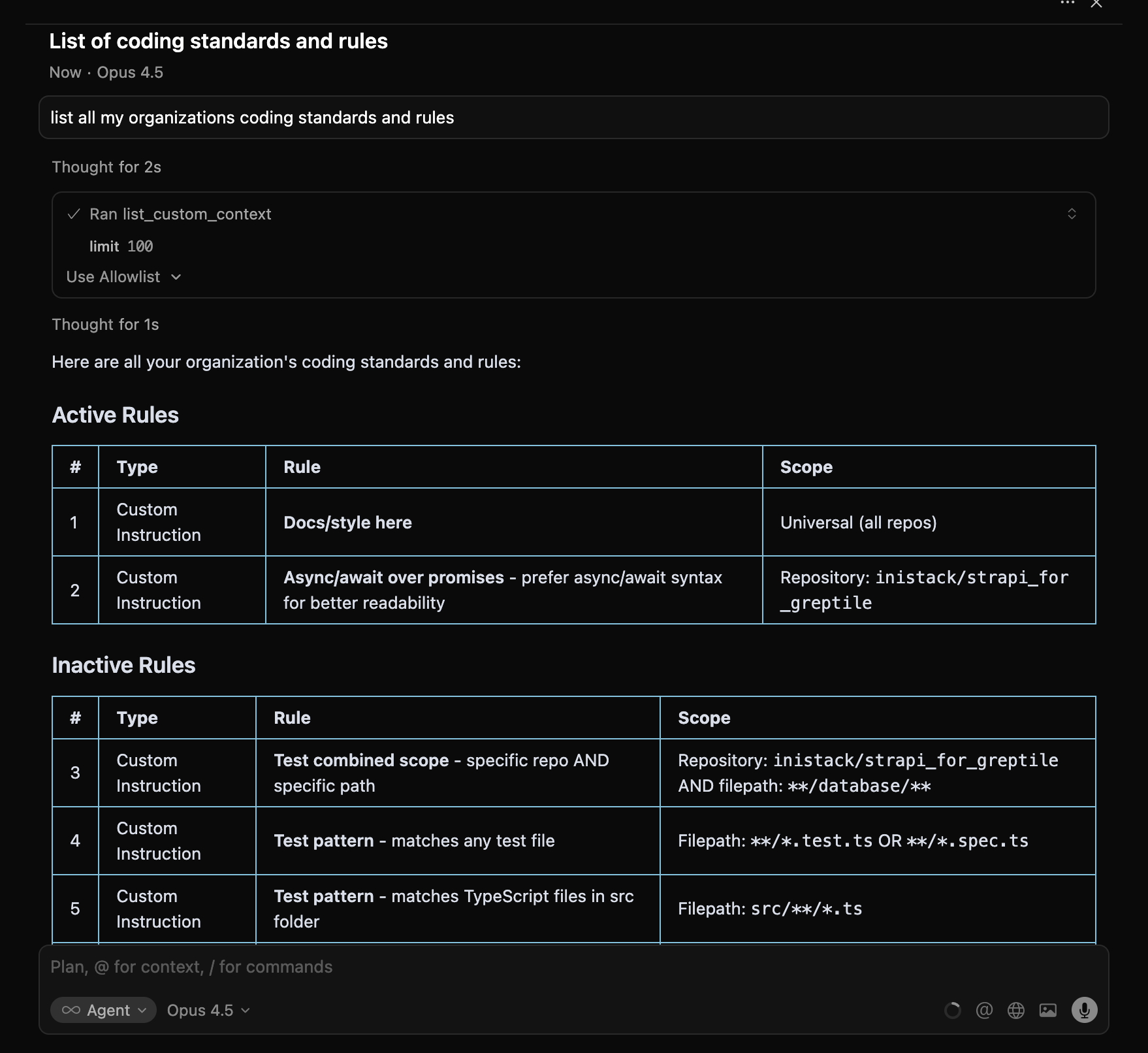
## View Your Patterns
```text theme={}
What coding patterns does my organization have?
```
**Tool used:** [`list_custom_context`](/mcp-v2/tools#list_custom_context)
 ***
## Search Patterns
```text theme={}
Search our coding patterns for error handling
```
**Tool used:** [`search_custom_context`](/mcp-v2/tools#search_custom_context)
***
## Get Pattern Details
```text theme={}
Show details for pattern 9c29e7ed-2d3f-45bd-846d-a61a59f10dd9
```
**Tool used:** [`get_custom_context`](/mcp-v2/tools#get_custom_context)
Returns the full pattern including `linkedComments`—PRs where this pattern triggered feedback.
***
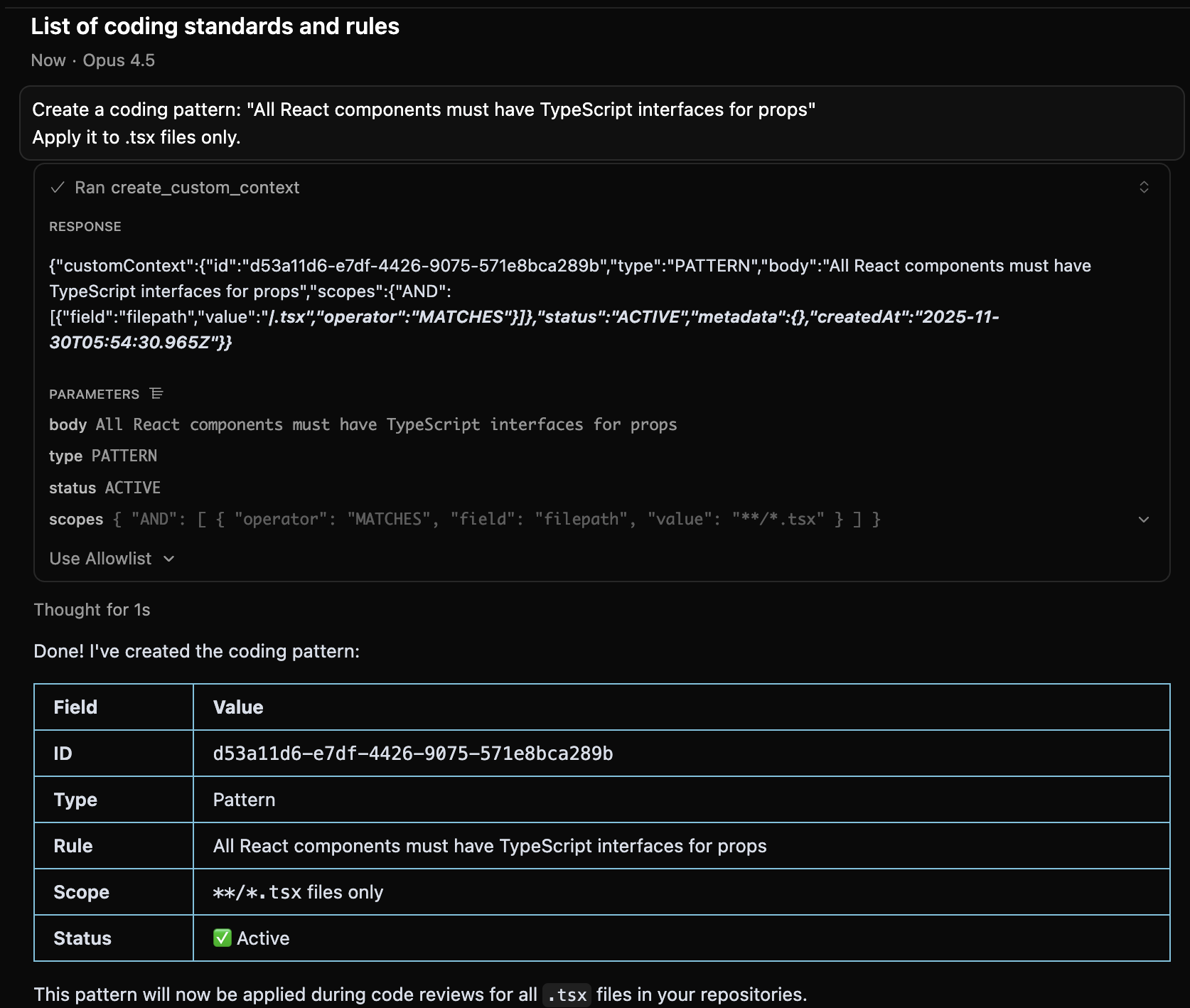
## Create a Pattern
```text theme={}
Create a coding pattern: "All React components must have TypeScript interfaces for props"
Apply it to .tsx files only.
```
**Tool used:** [`create_custom_context`](/mcp-v2/tools#create_custom_context)
***
## Search Patterns
```text theme={}
Search our coding patterns for error handling
```
**Tool used:** [`search_custom_context`](/mcp-v2/tools#search_custom_context)
***
## Get Pattern Details
```text theme={}
Show details for pattern 9c29e7ed-2d3f-45bd-846d-a61a59f10dd9
```
**Tool used:** [`get_custom_context`](/mcp-v2/tools#get_custom_context)
Returns the full pattern including `linkedComments`—PRs where this pattern triggered feedback.
***
## Create a Pattern
```text theme={}
Create a coding pattern: "All React components must have TypeScript interfaces for props"
Apply it to .tsx files only.
```
**Tool used:** [`create_custom_context`](/mcp-v2/tools#create_custom_context)
 ### Scope Examples
| You Say | Pattern Applies To |
| --------------------------- | ------------------------ |
| "Apply everywhere" | All files in all repos |
| "Apply to TypeScript files" | `**/*.ts` |
| "Apply to the api folder" | `**/api/**` |
| "Apply to owner/repo only" | That specific repository |
***
## Disable a Pattern
There's no delete. Set status to inactive:
```text theme={}
Disable the pattern about console.log statements
```
***
## Workflow: Turn Recurring Feedback Into a Pattern
When you notice Greptile making the same comment repeatedly:
```text theme={}
Search Greptile comments for "error handling"
```
Find comments that keep appearing across PRs.
```text theme={}
Create a pattern: "All catch blocks must log the error before re-throwing"
Apply to all TypeScript files.
```
```text theme={}
List my custom contexts and confirm the new pattern is ACTIVE
```
***
## Field Reference
| Field | Description |
| ---------------- | ---------------------------------------------------------------------------------------- |
| `body` | The rule text |
| `type` | `CUSTOM_INSTRUCTION` (explicit rule) or `PATTERN` (code pattern) |
| `status` | `ACTIVE`, `INACTIVE`, or `SUGGESTED` |
| `scopes` | Where it applies (see [tools reference](/mcp-v2/tools#create_custom_context) for format) |
| `commentsCount` | Times this pattern triggered a comment |
| `linkedComments` | PRs where this pattern was applied |
***
## Next Steps
Fix comments triggered by your patterns
Full parameter documentation
### Scope Examples
| You Say | Pattern Applies To |
| --------------------------- | ------------------------ |
| "Apply everywhere" | All files in all repos |
| "Apply to TypeScript files" | `**/*.ts` |
| "Apply to the api folder" | `**/api/**` |
| "Apply to owner/repo only" | That specific repository |
***
## Disable a Pattern
There's no delete. Set status to inactive:
```text theme={}
Disable the pattern about console.log statements
```
***
## Workflow: Turn Recurring Feedback Into a Pattern
When you notice Greptile making the same comment repeatedly:
```text theme={}
Search Greptile comments for "error handling"
```
Find comments that keep appearing across PRs.
```text theme={}
Create a pattern: "All catch blocks must log the error before re-throwing"
Apply to all TypeScript files.
```
```text theme={}
List my custom contexts and confirm the new pattern is ACTIVE
```
***
## Field Reference
| Field | Description |
| ---------------- | ---------------------------------------------------------------------------------------- |
| `body` | The rule text |
| `type` | `CUSTOM_INSTRUCTION` (explicit rule) or `PATTERN` (code pattern) |
| `status` | `ACTIVE`, `INACTIVE`, or `SUGGESTED` |
| `scopes` | Where it applies (see [tools reference](/mcp-v2/tools#create_custom_context) for format) |
| `commentsCount` | Times this pattern triggered a comment |
| `linkedComments` | PRs where this pattern was applied |
***
## Next Steps
Fix comments triggered by your patterns
Full parameter documentation