> ## Documentation Index
> Fetch the complete documentation index at: https://www.greptile.com/docs/llms.txt
> Use this file to discover all available pages before exploring further.
# Auto-Fix Workflow
> Fix Greptile code review comments directly from your IDE using MCP tools. Fetch unaddressed issues, apply suggested fixes, and track resolution progress.
Use Greptile MCP tools to fetch unaddressed comments and apply fixes directly from your IDE.
**Prerequisite:** [Configure MCP in your IDE](/mcp-v2/setup) before following these workflows.
**Using Claude Code?** [Agent skills](/mcp-v2/skills) automate the entire auto-fix loop for you. Run `/check-pr` to fix all review comments on a PR, or `/greploop` to iterate until Greptile gives a 5/5 confidence score.
## Your First Auto-Fix
Ask your AI assistant:
```text theme={}
List unaddressed Greptile comments for PR #5 in owner/repo
```
The assistant calls `list_merge_request_comments` with `addressed: false`.
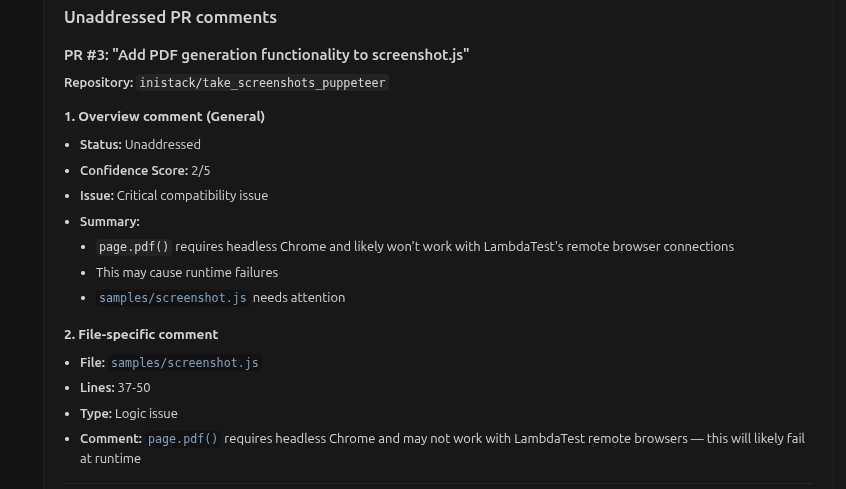 You'll see comments with their details including file path, issue type, and whether a fix is available.
For comments with `hasSuggestion: true`:
```text theme={}
Apply the suggested fix for the API token issue
```
The assistant applies the `suggestedCode` to your file.
You'll see comments with their details including file path, issue type, and whether a fix is available.
For comments with `hasSuggestion: true`:
```text theme={}
Apply the suggested fix for the API token issue
```
The assistant applies the `suggestedCode` to your file.
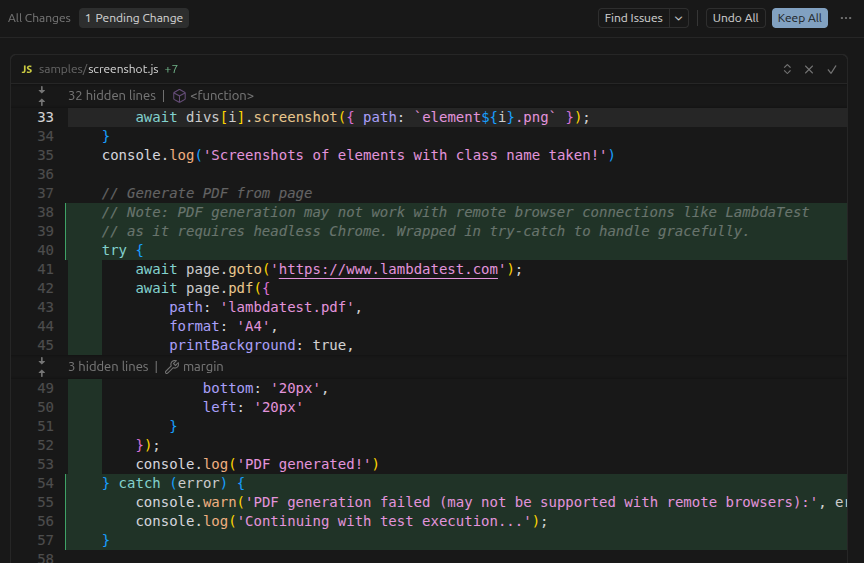 Review the changes, then click **Keep All** to apply them to your codebase.
After applying fixes, commit your changes. Greptile automatically marks comments as addressed when the file is modified.
***
## Understanding Comment Fields
When you fetch comments, each one includes these key fields:
| Field | Type | Description |
| ----------------------- | ------- | --------------------------------------------- |
| `isGreptileComment` | boolean | `true` if from Greptile |
| `addressed` | boolean | `true` if resolved by subsequent commit |
| `hasSuggestion` | boolean | `true` if includes a code fix |
| `suggestedCode` | string | The actual fix (when `hasSuggestion` is true) |
| `filePath` | string | File location (null for PR-level comments) |
| `lineStart` / `lineEnd` | number | Line range (null for general comments) |
| `linkedMemory` | object | Custom context that triggered this comment |
### How Comments Get "Addressed"
A comment becomes addressed when there's a **commit after the comment** that modifies the relevant file:
```text theme={}
1. Greptile comments on src/auth.ts
2. Developer pushes commit touching src/auth.ts
3. Comment marked as addressed: true
```
Check progress via `reviewAnalysis.reviewCompleteness` (e.g., "2/5 Greptile comments addressed").
***
## Common Prompts
```text theme={}
List all Greptile comments on PR #5 that have suggested code fixes
```
The assistant filters for `hasSuggestion: true`.
```text theme={}
Find Greptile comments about style or formatting and apply the fixes
```
Searches comment bodies for style-related keywords.
```text theme={}
What's the review status for PR #5? Are there any unaddressed critical issues?
```
Uses `get_merge_request` and checks `reviewAnalysis.reviewCompleteness`.
```text theme={}
Show Greptile comments for src/auth/login.ts
```
Filters results by `filePath`.
```text theme={}
Why did Greptile flag this issue? Show the linked coding pattern.
```
Checks the `linkedMemory` field for the associated custom context.
***
## Next Steps
Automate the full auto-fix loop with `/check-pr` and `/greploop`
Learn how `linkedMemory` connects comments to your patterns
Complete field documentation for all responses
Review the changes, then click **Keep All** to apply them to your codebase.
After applying fixes, commit your changes. Greptile automatically marks comments as addressed when the file is modified.
***
## Understanding Comment Fields
When you fetch comments, each one includes these key fields:
| Field | Type | Description |
| ----------------------- | ------- | --------------------------------------------- |
| `isGreptileComment` | boolean | `true` if from Greptile |
| `addressed` | boolean | `true` if resolved by subsequent commit |
| `hasSuggestion` | boolean | `true` if includes a code fix |
| `suggestedCode` | string | The actual fix (when `hasSuggestion` is true) |
| `filePath` | string | File location (null for PR-level comments) |
| `lineStart` / `lineEnd` | number | Line range (null for general comments) |
| `linkedMemory` | object | Custom context that triggered this comment |
### How Comments Get "Addressed"
A comment becomes addressed when there's a **commit after the comment** that modifies the relevant file:
```text theme={}
1. Greptile comments on src/auth.ts
2. Developer pushes commit touching src/auth.ts
3. Comment marked as addressed: true
```
Check progress via `reviewAnalysis.reviewCompleteness` (e.g., "2/5 Greptile comments addressed").
***
## Common Prompts
```text theme={}
List all Greptile comments on PR #5 that have suggested code fixes
```
The assistant filters for `hasSuggestion: true`.
```text theme={}
Find Greptile comments about style or formatting and apply the fixes
```
Searches comment bodies for style-related keywords.
```text theme={}
What's the review status for PR #5? Are there any unaddressed critical issues?
```
Uses `get_merge_request` and checks `reviewAnalysis.reviewCompleteness`.
```text theme={}
Show Greptile comments for src/auth/login.ts
```
Filters results by `filePath`.
```text theme={}
Why did Greptile flag this issue? Show the linked coding pattern.
```
Checks the `linkedMemory` field for the associated custom context.
***
## Next Steps
Automate the full auto-fix loop with `/check-pr` and `/greploop`
Learn how `linkedMemory` connects comments to your patterns
Complete field documentation for all responses