> ## Documentation Index
> Fetch the complete documentation index at: https://www.greptile.com/docs/llms.txt
> Use this file to discover all available pages before exploring further.
# Docker Compose Overview
> Deploy Greptile using Docker Compose on a single Linux server. Ideal for teams up to 100 developers with automated AWS Terraform or manual setup options.
Docker Compose runs all Greptile services on a single Linux host. Recommended for teams up to 100 developers.
## Choose Your Setup Path
Automated infrastructure + app deployment. Single `terraform apply` creates VPC, EC2, RDS, Redis, and bootstraps Greptile.
Bring your own Linux server. Works on any cloud (GCP, Azure) or on-prem.
## Prerequisites
### Server Requirements
| Team Size | CPU | RAM | Storage |
| --------- | -------- | ----- | ------- |
| 5-10 devs | 4 cores | 16GB | 100GB |
| \~50 devs | 8 cores | 32GB | 200GB |
| 100 devs | 32 cores | 128GB | 500GB |
**OS:** Ubuntu 20.04+, Amazon Linux 2023, or equivalent
**Software:** Docker 23.x+, Docker Compose v2.5+
### External Dependencies
**Container Registry** — Credentials provided by Greptile for pulling images.
**LLM Provider** — At least one of:
* Anthropic (Claude)
* OpenAI
* Azure OpenAI
* AWS Bedrock
**SCM Platform** — GitHub App or GitLab OAuth configured.
## Architecture
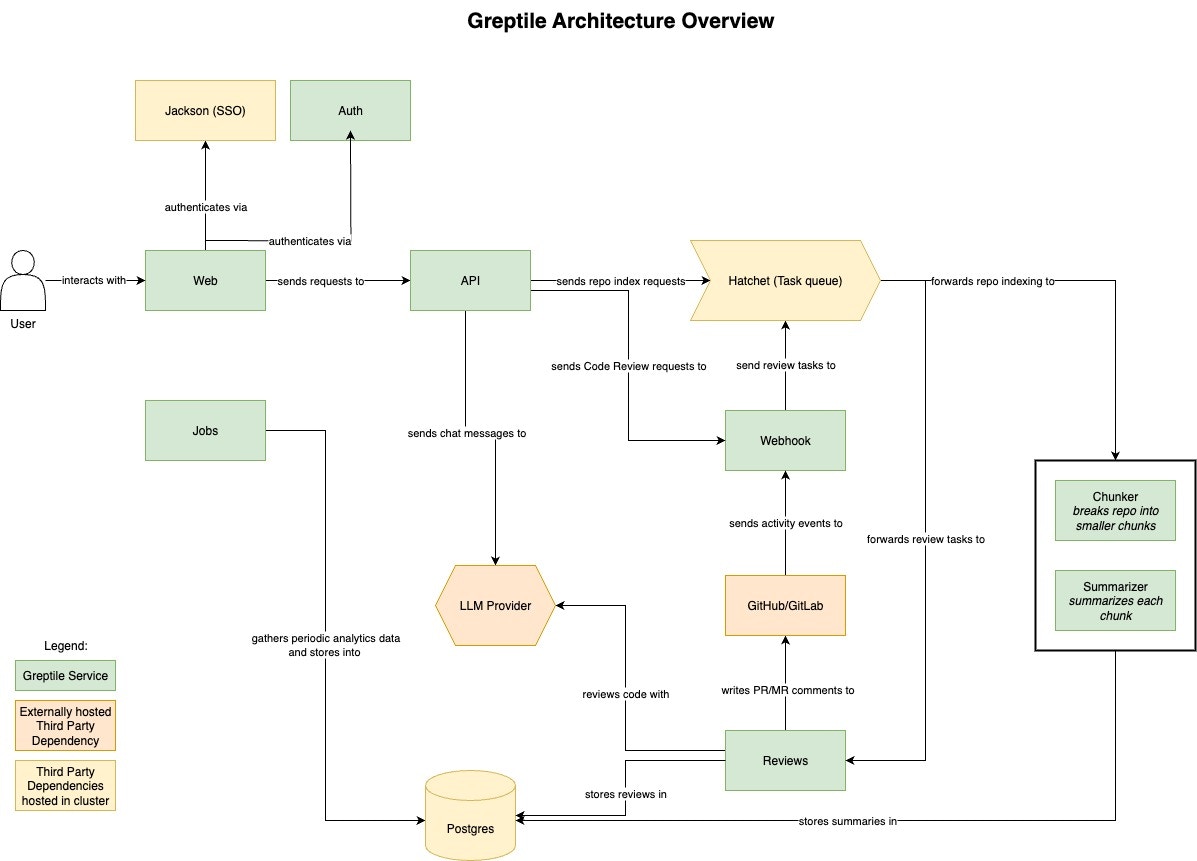 ### Services
| Service | Port | Purpose |
| ------------------- | ---- | ---------------------- |
| `greptile-web` | 3000 | Web UI |
| `greptile-api` | 3001 | REST API |
| `greptile-auth` | 3002 | Authentication |
| `greptile-webhook` | 3007 | SCM webhooks |
| `greptile-reviews` | 3005 | PR review generation |
| `greptile-llmproxy` | 4000 | LLM request routing |
| `hatchet-*` | 8080 | Workflow orchestration |
| `greptile-postgres` | 5432 | Application database |
| `saml-jackson` | 5225 | SAML SSO (optional) |
Background workers (`greptile-indexer-chunker`, `greptile-indexer-summarizer`, `greptile-jobs`) run without exposed ports.
### Network Requirements
**Inbound:**
* `3007` — SCM webhooks (required, must be publicly accessible)
* `3000` — Web UI
* `8080` — Hatchet admin (optional)
**Outbound:**
* LLM provider APIs
* SCM provider APIs
* Container registry
## Next Steps
* [AWS Terraform](/docker-compose/aws-terraform) — Automated AWS deployment
* [Manual Setup](/docker-compose/manual-setup) — Any cloud or on-prem
### Services
| Service | Port | Purpose |
| ------------------- | ---- | ---------------------- |
| `greptile-web` | 3000 | Web UI |
| `greptile-api` | 3001 | REST API |
| `greptile-auth` | 3002 | Authentication |
| `greptile-webhook` | 3007 | SCM webhooks |
| `greptile-reviews` | 3005 | PR review generation |
| `greptile-llmproxy` | 4000 | LLM request routing |
| `hatchet-*` | 8080 | Workflow orchestration |
| `greptile-postgres` | 5432 | Application database |
| `saml-jackson` | 5225 | SAML SSO (optional) |
Background workers (`greptile-indexer-chunker`, `greptile-indexer-summarizer`, `greptile-jobs`) run without exposed ports.
### Network Requirements
**Inbound:**
* `3007` — SCM webhooks (required, must be publicly accessible)
* `3000` — Web UI
* `8080` — Hatchet admin (optional)
**Outbound:**
* LLM provider APIs
* SCM provider APIs
* Container registry
## Next Steps
* [AWS Terraform](/docker-compose/aws-terraform) — Automated AWS deployment
* [Manual Setup](/docker-compose/manual-setup) — Any cloud or on-prem