> ## Documentation Index
> Fetch the complete documentation index at: https://www.greptile.com/docs/llms.txt
> Use this file to discover all available pages before exploring further.
# Greptile CLI
> Run local code reviews and manage Greptile from your terminal.
Use the Greptile CLI to review local branches before you push. This page covers Greptile CLI v3.2.3.
## Install
```bash theme={}
brew install greptileai/tap/greptile
```
```bash theme={}
npm install -g greptile@latest
```
```bash theme={}
curl -fsSL https://raw.githubusercontent.com/greptileai/cli/main/install.sh | bash
```
The npm package and install script require Node.js 22 or newer.
Check the installed version:
```bash theme={}
greptile --version
```
Upgrade npm and install script builds with `greptile update`. For Homebrew, run `brew upgrade greptile`.
## Sign in
Sign in once on each device:
```bash theme={}
greptile login
```
For CI or self-hosted deployments, use an API key:
```bash theme={}
export GREPTILE_API_KEY=...
greptile review
```
You can also store a key on the device. The command prompts for the key or reads it from stdin:
```bash theme={}
greptile login --api-key
```
Do not pass the key as a command-line argument. Shell history and process lists can expose it.
Check the current account and organizations:
```bash theme={}
greptile whoami
```
Use `greptile logout` to remove stored credentials. See [CLI Reviews on Self-Hosted Greptile](/docs/self-hosting/cli-reviews) to connect the CLI to a self-hosted deployment.
## Review a branch
Run a review from the repository root:
```bash theme={}
git checkout new-feature
greptile review
```
Greptile compares the current branch with the repository's default branch. It reviews committed changes that have not been merged. It ignores uncommitted changes.
Set the base branch:
```bash theme={}
greptile review --branch main
```
Give the reviewer extra instructions for this run:
```bash theme={}
greptile review --instructions "focus on error handling in the retry logic"
```
Greptile applies the text like an `@greptile ` comment on a pull request.
Resume the latest unfinished review for the repository:
```bash theme={}
greptile review --resume
```
### Include a sensitive file
The CLI holds back changed files that look like they contain secrets. Use `--include` only after you confirm the file is safe to send:
```bash theme={}
greptile review --include .env config/test-key.pem
```
Files passed to `--include` skip the sensitive-file check.
## Change the output
Show findings beside the changed code:
```bash theme={}
greptile review --diff
```
`--diff` is shorthand for `--layout diff`. The default layout is `comments`.
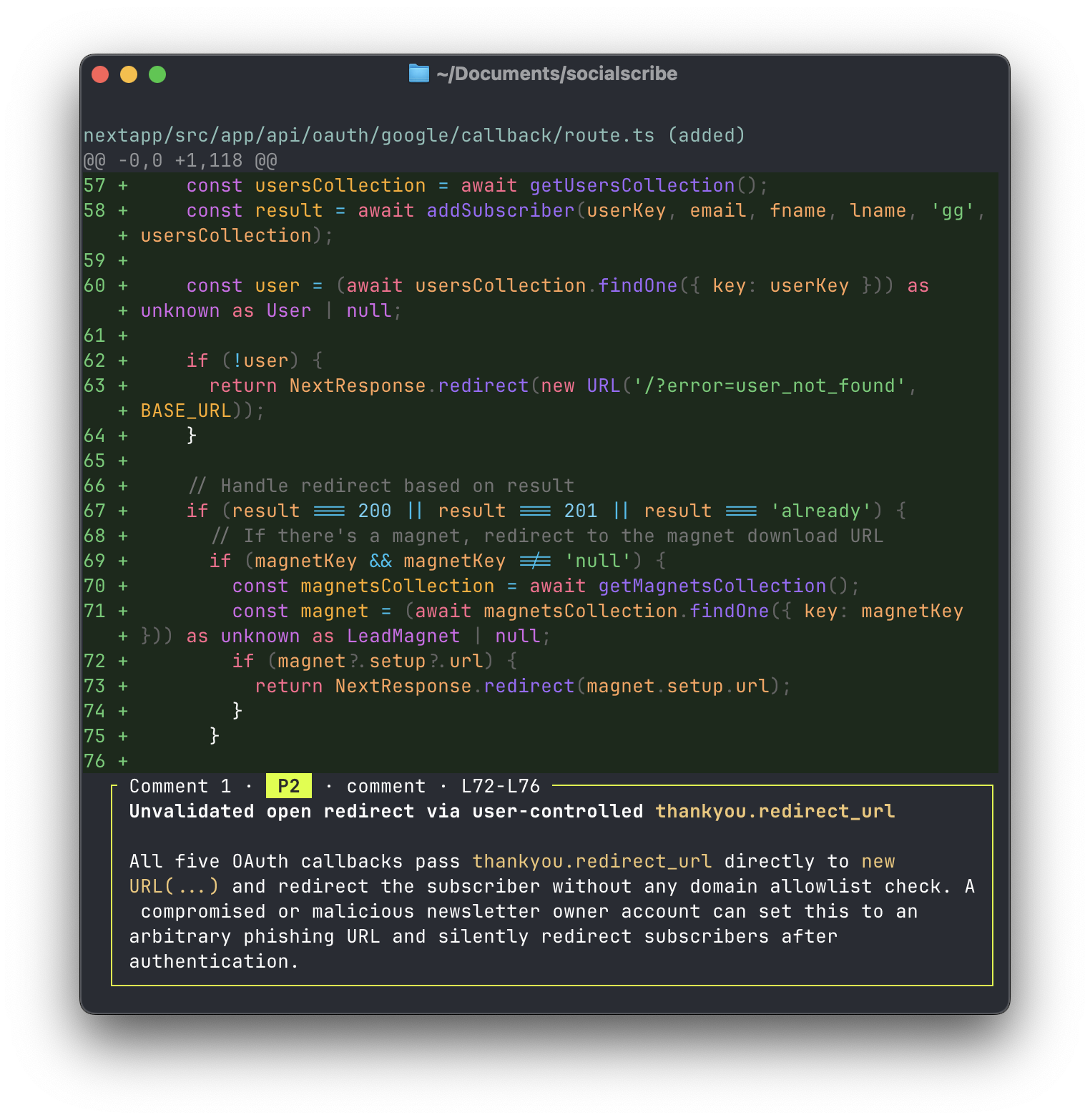 Change the number of nearby lines shown with each finding:
```bash theme={}
greptile review --diff --context 25
```
Use JSON for scripts:
```bash theme={}
greptile review --json
```
Use plain text for agents or other tools:
```bash theme={}
greptile review --agent
```
`--agent` is an alias for `--text`. Plain text is also the default when output is piped.
## Reopen a review
Open the recent review picker:
```bash theme={}
greptile review show
```
Open a review by ID:
```bash theme={}
greptile review show REVIEW_ID
```
When output is piped, or when you pass `--json`, `--text`, or `--agent`, omitting the ID prints recent reviews instead of opening the picker.
`review show` accepts the same output, layout, context, width, and color flags as `review`.
## Check review status
Check the latest review for `HEAD`:
```bash theme={}
greptile review status
```
Check another commit:
```bash theme={}
greptile review status --commit abc123
```
Add `--json` for machine-readable output.
This command works in hooks and scripts. It uses these exit codes:
| Code | Meaning |
| ----- | ------------------------------------------------------------------------------------------ |
| `0` | The commit has a completed review |
| `1` | No review exists, the user is signed out, or the repository has no origin |
| `2` | The command is invalid, the path is not a Git repository, or the commit cannot be resolved |
| `3` | A review is still running |
| `4` | The latest review failed |
| `5` | The latest review was cancelled |
| `130` | The user stopped the command with Ctrl+C |
## Inspect the effective review config
Show the review config that applies at the repository root:
```bash theme={}
greptile config
```
Pass a file path to resolve directory-scoped settings, rules, and instructions for that file:
```bash theme={}
greptile config packages/api/src/handler.ts
```
The output merges `.greptile/` files, dashboard settings, and organization rules. Add `--json` for machine-readable output. See [.greptile/ Configuration](/docs/code-review/greptile-config) for the config format.
## Save CLI settings
Run `greptile settings` in a terminal to open the interactive settings hub. It manages local CLI defaults, repositories, review settings, and team members.
Use subcommands in scripts:
```bash theme={}
greptile settings list
greptile settings get review.layout
greptile settings set review.layout diff
greptile settings unset review.layout
greptile settings path
```
Add `--json` to `settings`, `settings list`, or `settings get` for machine-readable output.
| Setting | Values |
| ---------------- | --------------------------------------------- |
| `color` | `true` or `false` |
| `apiBaseUrl` | API origin for a self-hosted deployment |
| `webBaseUrl` | Dashboard origin for a self-hosted deployment |
| `review.output` | `auto`, `text`, or `json` |
| `review.layout` | `comments` or `diff` |
| `review.context` | Nearby lines from `0` to `60`. Default: `15` |
| `review.width` | Output width from `40` to `240` columns |
A command-line flag overrides the saved setting for that run.
## Command reference
| Command | What it does |
| --------------------------- | ----------------------------------------------------------------------- |
| `greptile review` | Review the current branch against its base |
| `greptile review show [ID]` | Reopen a review or list recent reviews |
| `greptile review status` | Report the latest review status for a commit |
| `greptile config [PATH]` | Show the effective review config for a repository or file |
| `greptile login` | Sign in through a browser or with `--api-key` |
| `greptile onboard` | Run the interactive setup wizard |
| `greptile logout` | Remove stored credentials |
| `greptile whoami` | Show the current account and organizations |
| `greptile settings` | Manage CLI preferences, repositories, review settings, and team members |
| `greptile fix` | Install, inspect, or remove Fix in Claude Code on macOS |
| `greptile update` | Update the CLI |
Run `greptile --help` for command-specific help.
### Review options
| Flag | Purpose |
| --------------------------- | ---------------------------------------------------------------- |
| `-b, --branch ` | Set the base branch. Defaults to the repository's default branch |
| `--resume` | Continue the latest unfinished review for this repository |
| `--include ` | Include files held back as sensitive |
| `--instructions ` | Add instructions for this review |
| `--json` | Print JSON |
| `--text`, `--agent` | Print plain text. `--agent` is an alias for `--text` |
| `--layout ` | Set the findings layout. Default: `comments` |
| `--diff` | Use the `diff` layout |
| `--context ` | Set nearby lines from `0` to `60`. Default: `15` |
| `--width ` | Set output width from `40` to `240` columns |
| `--color` | Enable color and override a saved setting |
| `--no-color` | Disable color |
### Fix commands
| Command | What it does |
| -------------------------------------------- | --------------------------------------------------------- |
| `greptile fix install` | Install or repair Fix in Claude Code |
| `greptile fix status [--json]` | Check whether Fix in Claude Code is ready |
| `greptile fix uninstall [--remove-mappings]` | Remove Fix and optionally remove saved repository folders |
## Next
Set up an organization and run your first review.
Use Greptile review data from your editor or coding agent.
Change the number of nearby lines shown with each finding:
```bash theme={}
greptile review --diff --context 25
```
Use JSON for scripts:
```bash theme={}
greptile review --json
```
Use plain text for agents or other tools:
```bash theme={}
greptile review --agent
```
`--agent` is an alias for `--text`. Plain text is also the default when output is piped.
## Reopen a review
Open the recent review picker:
```bash theme={}
greptile review show
```
Open a review by ID:
```bash theme={}
greptile review show REVIEW_ID
```
When output is piped, or when you pass `--json`, `--text`, or `--agent`, omitting the ID prints recent reviews instead of opening the picker.
`review show` accepts the same output, layout, context, width, and color flags as `review`.
## Check review status
Check the latest review for `HEAD`:
```bash theme={}
greptile review status
```
Check another commit:
```bash theme={}
greptile review status --commit abc123
```
Add `--json` for machine-readable output.
This command works in hooks and scripts. It uses these exit codes:
| Code | Meaning |
| ----- | ------------------------------------------------------------------------------------------ |
| `0` | The commit has a completed review |
| `1` | No review exists, the user is signed out, or the repository has no origin |
| `2` | The command is invalid, the path is not a Git repository, or the commit cannot be resolved |
| `3` | A review is still running |
| `4` | The latest review failed |
| `5` | The latest review was cancelled |
| `130` | The user stopped the command with Ctrl+C |
## Inspect the effective review config
Show the review config that applies at the repository root:
```bash theme={}
greptile config
```
Pass a file path to resolve directory-scoped settings, rules, and instructions for that file:
```bash theme={}
greptile config packages/api/src/handler.ts
```
The output merges `.greptile/` files, dashboard settings, and organization rules. Add `--json` for machine-readable output. See [.greptile/ Configuration](/docs/code-review/greptile-config) for the config format.
## Save CLI settings
Run `greptile settings` in a terminal to open the interactive settings hub. It manages local CLI defaults, repositories, review settings, and team members.
Use subcommands in scripts:
```bash theme={}
greptile settings list
greptile settings get review.layout
greptile settings set review.layout diff
greptile settings unset review.layout
greptile settings path
```
Add `--json` to `settings`, `settings list`, or `settings get` for machine-readable output.
| Setting | Values |
| ---------------- | --------------------------------------------- |
| `color` | `true` or `false` |
| `apiBaseUrl` | API origin for a self-hosted deployment |
| `webBaseUrl` | Dashboard origin for a self-hosted deployment |
| `review.output` | `auto`, `text`, or `json` |
| `review.layout` | `comments` or `diff` |
| `review.context` | Nearby lines from `0` to `60`. Default: `15` |
| `review.width` | Output width from `40` to `240` columns |
A command-line flag overrides the saved setting for that run.
## Command reference
| Command | What it does |
| --------------------------- | ----------------------------------------------------------------------- |
| `greptile review` | Review the current branch against its base |
| `greptile review show [ID]` | Reopen a review or list recent reviews |
| `greptile review status` | Report the latest review status for a commit |
| `greptile config [PATH]` | Show the effective review config for a repository or file |
| `greptile login` | Sign in through a browser or with `--api-key` |
| `greptile onboard` | Run the interactive setup wizard |
| `greptile logout` | Remove stored credentials |
| `greptile whoami` | Show the current account and organizations |
| `greptile settings` | Manage CLI preferences, repositories, review settings, and team members |
| `greptile fix` | Install, inspect, or remove Fix in Claude Code on macOS |
| `greptile update` | Update the CLI |
Run `greptile --help` for command-specific help.
### Review options
| Flag | Purpose |
| --------------------------- | ---------------------------------------------------------------- |
| `-b, --branch ` | Set the base branch. Defaults to the repository's default branch |
| `--resume` | Continue the latest unfinished review for this repository |
| `--include ` | Include files held back as sensitive |
| `--instructions ` | Add instructions for this review |
| `--json` | Print JSON |
| `--text`, `--agent` | Print plain text. `--agent` is an alias for `--text` |
| `--layout ` | Set the findings layout. Default: `comments` |
| `--diff` | Use the `diff` layout |
| `--context ` | Set nearby lines from `0` to `60`. Default: `15` |
| `--width ` | Set output width from `40` to `240` columns |
| `--color` | Enable color and override a saved setting |
| `--no-color` | Disable color |
### Fix commands
| Command | What it does |
| -------------------------------------------- | --------------------------------------------------------- |
| `greptile fix install` | Install or repair Fix in Claude Code |
| `greptile fix status [--json]` | Check whether Fix in Claude Code is ready |
| `greptile fix uninstall [--remove-mappings]` | Remove Fix and optionally remove saved repository folders |
## Next
Set up an organization and run your first review.
Use Greptile review data from your editor or coding agent.