> ## Documentation Index
> Fetch the complete documentation index at: https://www.greptile.com/docs/llms.txt
> Use this file to discover all available pages before exploring further.
# Configure Which PRs Should Be Reviewed
> Configure which PRs Greptile reviews with filters for labels, branches, authors, and keywords. Set up manual triggers, status checks, and auto-review.
By default, Greptile reviews **every new PR** when it is first opened or when a user comments `@greptileai` on the PR. It can also be configured to review PRs on certain triggers.
### Draft PR Behavior
**Draft PRs are not automatically reviewed** by default to avoid noise during development. However, you can:
* **Manually trigger** reviews on draft PRs by commenting `@greptileai`
* Reviews will automatically start when you **mark the PR as ready for review**
### Filters
You can configure Greptile to only review PRs that match certain filters. The filters can be configured in the [dashboard](https://app.greptile.com/review), or in your [`greptile.json` file](/code-review-bot/greptile-json).
| Filter By | Description |
| ---------- | ----------------------------------------------------------------------------------------------------- |
| `labels` | Include or exclude PRs with specific labels |
| `branches` | Include or exclude PRs to or from specific branches |
| `author` | Include or exclude PRs based on PR author |
| `keywords` | Include or exclude PRs containing a specific keyword in the title, description,or last commit message |
### Manual Triggering
You can trigger Greptile to review a PR manually by commenting `@greptileai` on the PR.
#### When to Use Manual Triggering
* **Draft PRs** that need early feedback
* **Re-review after major changes** (though Greptile will note what changed)
* **PRs that don't match automatic triggers** due to filters
* **Testing Greptile configuration** changes
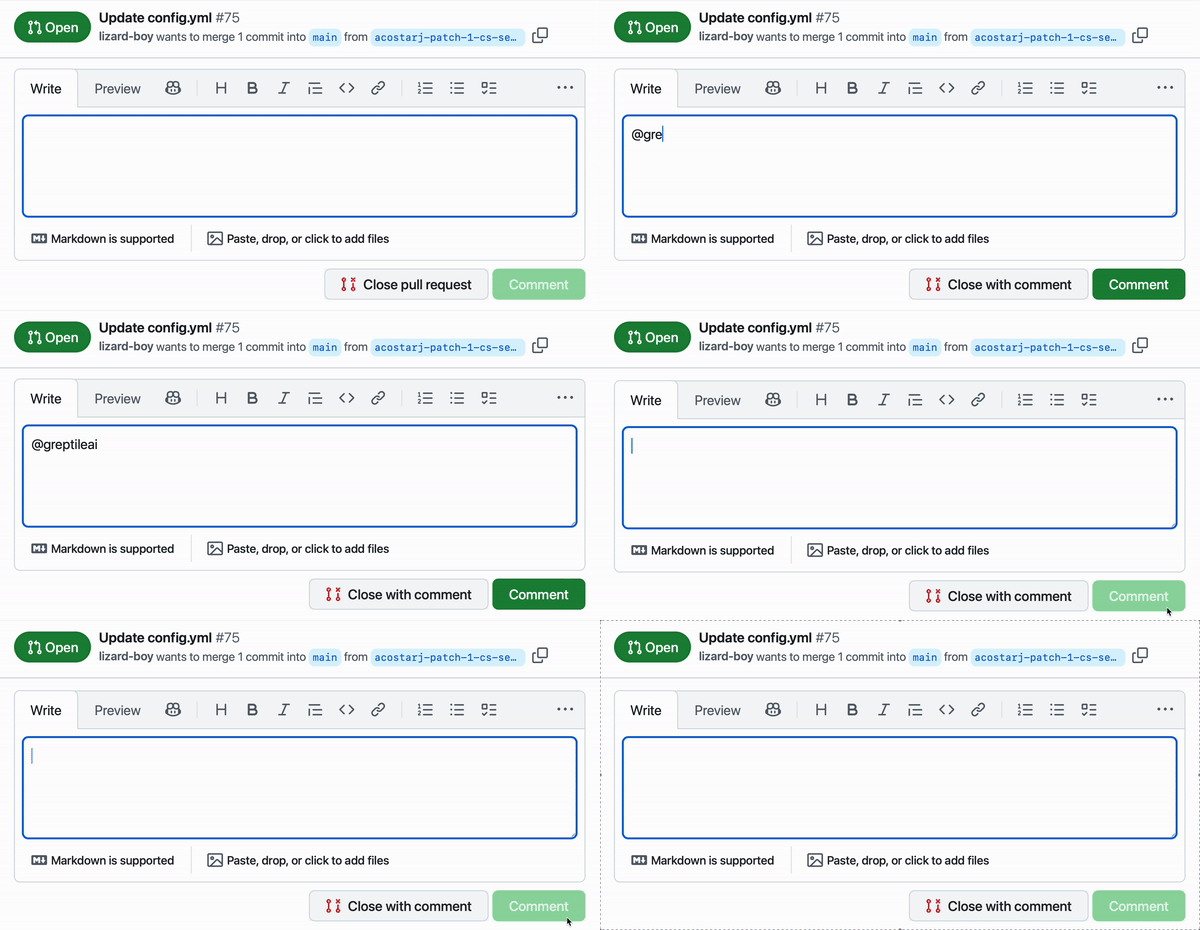 Example of Greptile AI code review trigger
GitHub does not allow users to tag agents/bots, so as you comment `@greptileai` it may not show you the agent in the dropdown suggestions.
### Status Checks & Merge Protection
You can configure Greptile to **block merging** until reviews are complete:
#### GitHub Status Checks
1. Go to your repository Settings → Branches
2. Add or edit a branch protection rule
3. Enable "Require status checks to pass before merging"
4. Search for and select the **Greptile status check**
5. Save the protection rule
#### Benefits
* **Prevents accidental merges** before review completion
* **Ensures code quality** by requiring Greptile approval
* **Integrates with existing workflows** alongside other required checks
Status checks will prevent merging even if Greptile finds no issues. Make sure your team understands this workflow change.
### Auto-Review on Every Commit
By default, Greptile only reviews the initial PR. You can enable **continuous review**:
```json greptile.json theme={}
{
"triggerOnUpdates": true
}
```
When enabled:
* **Every new commit** to the PR branch triggers a fresh review
* **Keeps reviews current** as code evolves
* **May increase review volume** - consider adjusting strictness settings
### Review Limitations
* **Cannot cancel running reviews** - wait for completion before pushing major changes
* **Reviews PRs/MRs only** - individual commits are not reviewed separately
* **Single-pass system** - each review is independent, not iterative
Example of Greptile AI code review trigger
GitHub does not allow users to tag agents/bots, so as you comment `@greptileai` it may not show you the agent in the dropdown suggestions.
### Status Checks & Merge Protection
You can configure Greptile to **block merging** until reviews are complete:
#### GitHub Status Checks
1. Go to your repository Settings → Branches
2. Add or edit a branch protection rule
3. Enable "Require status checks to pass before merging"
4. Search for and select the **Greptile status check**
5. Save the protection rule
#### Benefits
* **Prevents accidental merges** before review completion
* **Ensures code quality** by requiring Greptile approval
* **Integrates with existing workflows** alongside other required checks
Status checks will prevent merging even if Greptile finds no issues. Make sure your team understands this workflow change.
### Auto-Review on Every Commit
By default, Greptile only reviews the initial PR. You can enable **continuous review**:
```json greptile.json theme={}
{
"triggerOnUpdates": true
}
```
When enabled:
* **Every new commit** to the PR branch triggers a fresh review
* **Keeps reviews current** as code evolves
* **May increase review volume** - consider adjusting strictness settings
### Review Limitations
* **Cannot cancel running reviews** - wait for completion before pushing major changes
* **Reviews PRs/MRs only** - individual commits are not reviewed separately
* **Single-pass system** - each review is independent, not iterative